
Google Search results are the listings and visual elements that appear on a search engine results page (SERP) after a user enters a query into Google. They are composed of various areas, each serving a specific function to help users find the most relevant information quickly and efficiently. They serve a unique purpose in enhancing user experience, sourcing information efficiently, and supporting different search intents. The results are organized into different sections—including organic listings, paid ads, featured snippets, and interactive modules like “People Also Ask” or “AI Overviews”—each tailored to address specific types of search intent. Google’s algorithms evaluate factors like relevance, authority, location, and recency to determine the placement and formatting of these results.
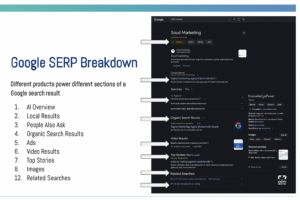
AI Overview (Search Generative Experience)
The AI Overview, also known as Search Generative Experience (SGE), is a relatively new feature designed to provide users with a concise, AI-generated summary of the topic they searched for. This section appears at the very top of the search results for complex or multi-faceted queries. It gathers and synthesizes information from multiple high-quality sources to give users a quick understanding of the topic, often accompanied by suggested follow-up questions and links to delve deeper. This tool is especially helpful for users looking to quickly grasp broad or nuanced subjects, such as comparing two concepts or planning an activity.
Local Results (Local Pack / Map Pack)
Local Search Results, often referred to as the Local Pack or Map Pack, are a group of listings that show up when a search has local intent—for example, searching for “hvac near me” or “best plumbers in Jacksonville.” This section typically features a map and a set of three business listings, each including information such as business name, ratings, hours of operation, location, and sometimes contact info or reviews. Clicking into this area brings the user into a more detailed view on Google Maps. These results are powered by businesses’ Google Business Profiles and are essential for helping users find services nearby.
People Also Ask (PAA)
The People Also Ask section is an accordion box that provides a list of commonly asked questions related to the topic the user is searching. Each question can be clicked to reveal a short answer pulled from a webpage, along with a link to the source. What makes this feature particularly engaging is that it dynamically expands: every time a question is clicked, more related questions appear. This helps users explore the topic in greater depth and often serves as a bridge to related content they hadn’t considered originally.
Organic Search Results
Organic search results are the backbone of any Google Search page. These are the traditional blue-link results that appear based on Google’s search algorithm, which considers factors like relevance, authority, content quality, freshness, and page usability. Each listing typically includes a page title, a short meta description, and the URL. Sometimes, these results are enhanced with “rich snippets,” such as ratings, prices, or FAQ sections. Organic results are unpaid and earned by websites through strong SEO (Search Engine Optimization) practices.
Ads (Search Ads / PPC)
Search Ads are paid listings that appear at the top or bottom of the search results page and are marked with a small “Ad” label. These results come from Google Ads, where advertisers bid on keywords to appear in response to specific queries. Ads can include additional features like call buttons, site links, special offers, and more. These are particularly prominent for high-commercial-intent searches such as “buy laptop” or “car insurance quotes,” and they aim to drive conversions, purchases, or leads.
Shopping Results (Google Shopping / Product Listings)
Shopping Results are visual listings that appear in a grid or carousel format, often near the top of the page, for product-related searches. These results display key product information such as an image, price, product name, retailer, and rating. Clicking on a result typically leads to a product page on a retailer’s website or within Google Shopping itself. These results are powered by the Google Merchant Center and are commonly seen for searches like “Nike running shoes” or “best air purifiers.”
Video Results
Video Results display thumbnails of videos that are relevant to the search query, typically pulled from platforms like YouTube. These results often include timestamps, titles, publishers, and sometimes chapters or “key moments” to help users skip to the part of the video that matches their intent. This section is useful for “how-to” queries, educational content, tutorials, or entertainment topics. Clicking a thumbnail takes the user directly to the video on its host platform.
Top Stories (News Carousel)
The Top Stories section appears as a carousel or box of the latest news articles related to the search topic. This section is especially prominent for timely, trending, or breaking news topics. Each result typically includes a headline, publisher name, publication time, and a thumbnail image. These stories are sourced from Google News-approved outlets and are designed to give users fast access to journalistic coverage from authoritative sources.
Knowledge Panel
The Knowledge Panel appears on the right side of the results page on desktop (or near the top on mobile) when users search for well-known entities like people, organizations, events, or places. It provides a structured summary of information, including images, key facts, dates, notable accomplishments, and links to official websites or social profiles. This data is compiled from trusted sources such as Wikipedia, Google’s Knowledge Graph, and other authoritative databases. It’s especially helpful for quickly learning about public figures, companies, or historical events.
Featured Snippet (Position Zero)
A Featured Snippet is a highlighted box that appears at the very top of the organic results, commonly referred to as “Position Zero.” It extracts a brief answer to the user’s query from a webpage and displays it prominently, along with the source URL and sometimes an image or list. This feature is ideal for queries that seek a direct answer, such as definitions, how-to steps, or comparisons. It offers users a quick takeaway without needing to click into a website, although many still do for more detail.
Sitelinks
Sitelinks are additional links shown under a main search result, directing users to other important sections of the same website. For example, a search for “IRS” might show sitelinks like “Get Your Refund Status,” “Forms & Instructions,” or “Make a Payment.” These links help users navigate directly to popular or relevant areas within a site, saving them time and clicks. Sitelinks are generated automatically by Google based on site structure and user behavior.
Related Searches
At the bottom of most search results pages is the Related Searches section. This area suggests alternative or related queries that users might want to explore based on their original search. For instance, a search for “best yoga mats” might be followed by related searches like “non-slip yoga mat” or “eco-friendly yoga mat.” These suggestions help guide users through their discovery process and can be especially useful when the original search doesn’t fully answer their question.